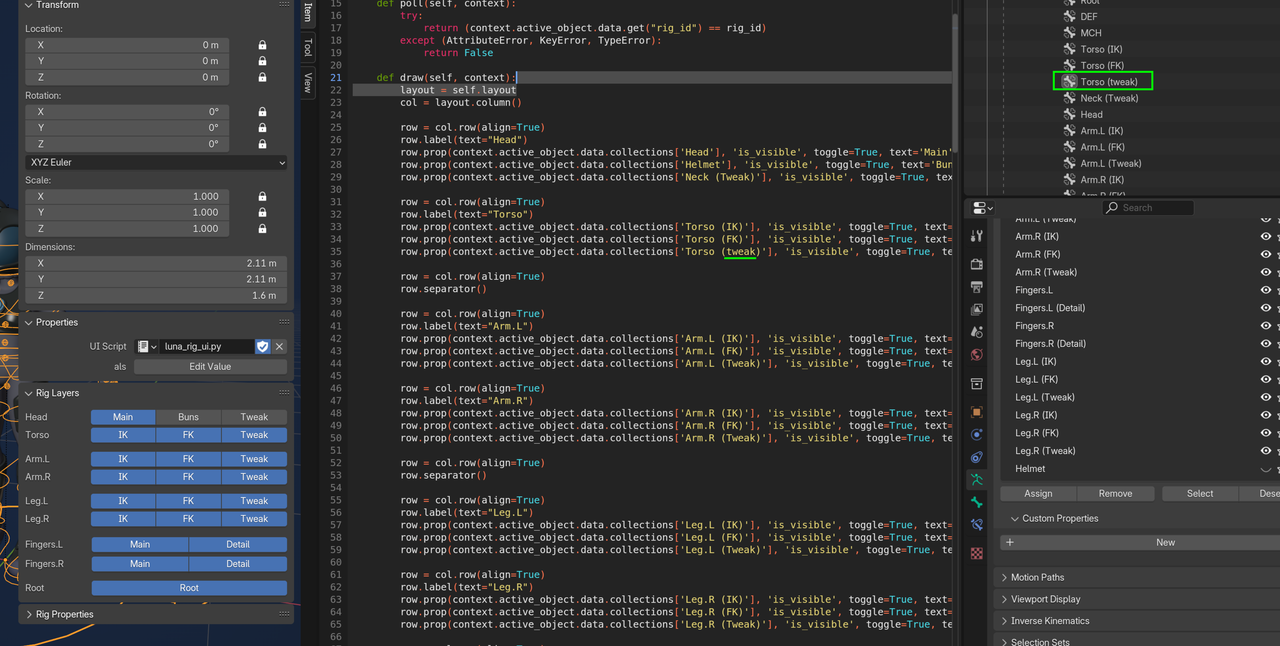
When I run the script, the "Rig Layers" section only contains the Head and Torso. I'm assuming I misspelled a name or something, but I can't quite figure out what I did wrong. Any ideas?

Make sure you have the same Case. For example head is different then Head or heaD. Also make sure you don't have extra spaces. Especially at the beginning of the bone collection name.
Thanks guys,
I double checked and I did have a few bone collection names that didn't match the script. Correcting them didn't resolve the problem. Here's my blend file.
https://www.dropbox.com/scl/fi/okq190e96rvjzxs2mae3f/luna_rig_08.blend?rlkey=55v944pufniia2lfnxdcu54iz&dl=0
One note: I wasn't running any of the cleanup scripts. I was doing it all by hand because early on I'd get errors every time I tried to run them (I did the class in Blender v 4.2.22 if that makes any difference). I tried troubleshooting, but after a while I just decided I would do it all manually just to get the extra practice. So maybe the problem lies in there.
That was it. Working fine now. Can't believe I missed that.
Thanks soooooo much Martin!