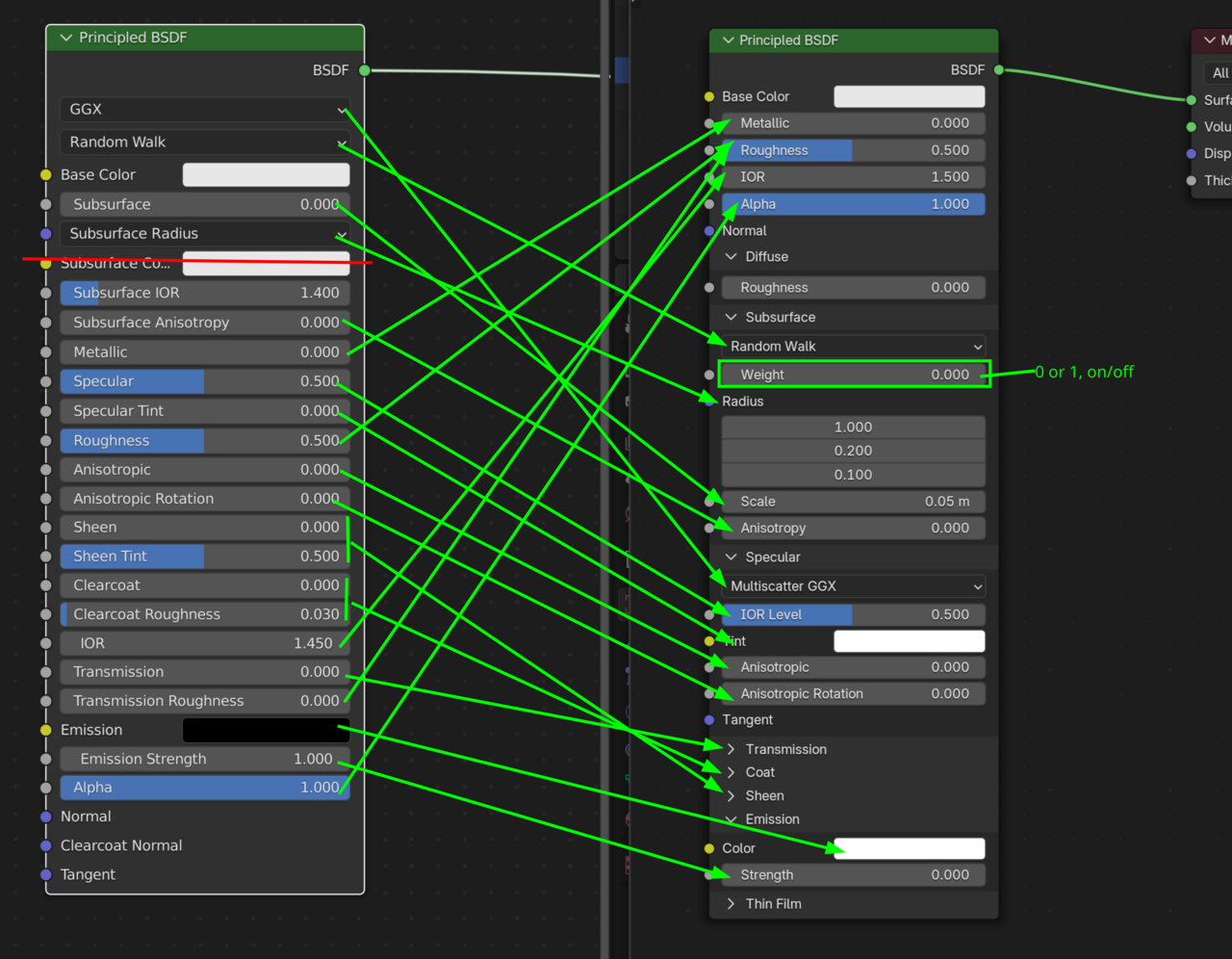
Hello again, so i managed to follow along perfectly, apart from one issue i found, that being that i am using Blender version 4.4511, and when it came to changing certain settings for the material shaders, i found that my panel was different to yours, additionally, whilst your panel showed subsections such as Specular IOR and Subsurface Scattering IOR, mine does not, and instead has changed its fields to "weight", "radius", "scale" & "anisotropy", etc, i had a little play to see what did what, but could not match what you did...
Was there one material in particular or was it just all of them? I did the course with 5.1 not too long ago and was mostly able to follow. I'm taking a look at the 4.5 Principled BSDF, and there's a section with a drop down for Specular that has a IOR Level and on the Sub Surface Scattering, if you switch it to Random Walk Skin, that has an IOR value, though I'm not sure if those will match exactly what he did there.
I was looking at that particular video and didn't see where he used any of those values, Nor in the video before. He does talk about them more in the materials course he did, but I don't think he uses those in this course so you should be fine.
It was just those certain couple (subsurface IOR & specular IOR) that i couldnt find an exact or same named version on the nodes, such as the IOR, and yes, i should have really used the same version of blender, but i am fedup of having to switch over versions every time i do a different tutorial, its one part of all this i dislike and is a headache at best
If i have a project that means i have to use many different versions of blender just because i learnt that way, then it is gonna be a huge issue with compatibility and having to know what to change, where to change it, etc
My other new issue is that i cannot reset the UV Editing unwrap i did, this was because, again, i used 4.5.1.1 and instead of having as your screen showed, UV Unwrap, the UV Unwrap i clicked was instead a container for a variety of unwraps... not an issue in itself, but after playing around with it and finding it put lots of boxes in, instead of the one i needed for the selected screen face, i now find there is not a tool option to delete these boxes off, so i can start it again, and it is frustrating because i just wanna finish it
the other big issue with all this in general is, i do not wish to miss out on quality tutorials because of version differences, and also even if i use the same version of blender, that teaches me nothing about how it works when changed in another version... seems like an uphill struggle for those of us inexperienced, and at the very least a lot of reading manuals and looking up changes tht detracts from the creativity and adds a lot more learning UI and additions
Are there any comprehensive blender version change guides put out, or is that somehting we have to do ourselves?
Hi Grady, they were there on his material panel, and yes he used both Specular IOR and Subsurface IOR when assigning materials, i wanted to replicate his exact settings so i had that baseline, then i could adjust for personal preference, but couldnt find the matching fields in 4.5, i did know there were some changes that put most into the Principle BDSF Node, but they aint all there and they arent all the same even if the text says something similar or even the same, it is a little confusing

With every version change there is a general overview video being released on Youtube that walks through all the changes.
Generally speaking I can understand your frustration with the constant changes, but I can assure you that will go away. Besides, the changes are mostly to the UI anyway, the underlying principles don't change. Once you start getting a grip on the principles, you won't have to change versions anymore and will be comfortable doing older tutorials with the newer versions.
It's just a matter of comfort level that will increase as you go. The beginnings are tough but it will get much easier and you'll likely reach a point where you won't even think about version numbers anymore. :)
Thanks for replying Sascha, and yeah, i have seen that myself pretty much consistently, new additions, and normally as you say its a UI update of things
I'm sure i will get there once i am more up-to-date, and thanks for that yeah, i forgot about the video releases they put out, thats perfect if it walks us through all the changes, exactly what i was looking for
My fault for using an updated version despite being told not to tbf, but i am so eager to get these courses completed that any setback is annoying to me lol, i best chill out a bit if my ADHD lets me and stop annoying the tutors

You can't delete verts/Faces in a UV Map. That is true of all software. You can temporarily hide them(H) and unhide them (Alt+H), or move them (G) or scale them down to 0 or really small (S). Remember that UV Maps are just a 2D layout of your mesh. Now if you're using UDIM you can separate them into different textures, but they still are part of the same UV Map.
All the principal nodes were updated, both under the hood and in its presentation/layout. Some things were renamed to make it clearer since somethings were misleading. Also, Cycles has been revamped, and the default color management profile has changed. That is why it's commonly said to adjust materials based on what you see and not by matching numbers exactly. This is a hard one for me, because I'm very much a match the numbers person. I'm also more technically minded. That's why video editing, rigging, and TD are easier for me than modeling and the dreaded sculpting. I'll finish the sculpting course someday. With that said, Sticking with one version does add an additional layer of anxiety and frustration, but can also be very rewarding. Especially if you like those spot the difference puzzles.
Blender is under major development. The Everything nodes project originally was to be completed somewhere around 2026, but do to new projects (I'm looking at you layered animation), new tools (for example cloth sim brush in sculpt and brushes as assets), and technical difficulties it has been pushed back.
Thanks for adding that Dwayne, yeah i getcha brother, i am in both camps at the moment, i use my eye and make it aesthetically pleasing to myself for sure, but i like to be able to emulate everything that i am being shown by my tutors, and then go ahead and make my changes from that baseline - i dont wanna miss anything, i am skilling up and wanna retain and replicate to boost my learning
The only reason i came to Blender was because of how amazing these guys all are, making and keeping Blender open source... i have always loved and understood the power of open source, and for me it showed a serious passion, was a bold move against competition like 3D Studio Max, Lightwave, Maya and SoftImage, but also open sourcekeeps everyone honest and those that know how can and do produce so much for the whole community and the blender software, that it shows a lot there too
When that much is put into it, thats why its free to download Blender, we all own it, we all contribute in one way or another, and that made this such a unique and needed alternative to what then was £1000s for the best software, and now look where the greedy so and so's took their business model... straight to monthly subscription, optional extras, [pay every month and never own the software (i know currently you can get the software for a one off price still, but i bet they plan on removing that IF their figures show they have captured the majority for long enough on the subscription option)
Corporatism destroys everything, so i am glad i have something worthwhile, within my financial range and a trustworthy, lively and active friendly community and tutors to rely upon for my necessary educational requirements & creative dreams, plans and ambitions