
Hi everyone,
I'm new to CG Cookie and just started my learning journey.
I'm looking for a good Blender reference that covers both keyboard shortcuts and where to find the same commands in the menus.
For example:
Select More/Less → Where can I find it in the menus?
Apply Scale → Which menu is it under?
Sometimes I remember what I want to do, but I can't remember the shortcut, and other times I know the shortcut but I'd like to understand where the command actually lives in Blender. I think this would also help me learn the interface much better instead of relying only on hotkeys.
Does anyone have a PDF, cheat sheet, or any guide that you personally recommend?
Thanks in advance! I'm really excited to learn here. 😊

Hi Bassam BBΞSM ,
Actually, I'd recommend you use the Search in Blender, that gives you all the information you need, like the Shortcut and where it lives in the Menus.
Now, I have it mapped to the Spacebar, but otherwise (and I believe, by default) it is the F3-Key.
For instance Apply Scale:
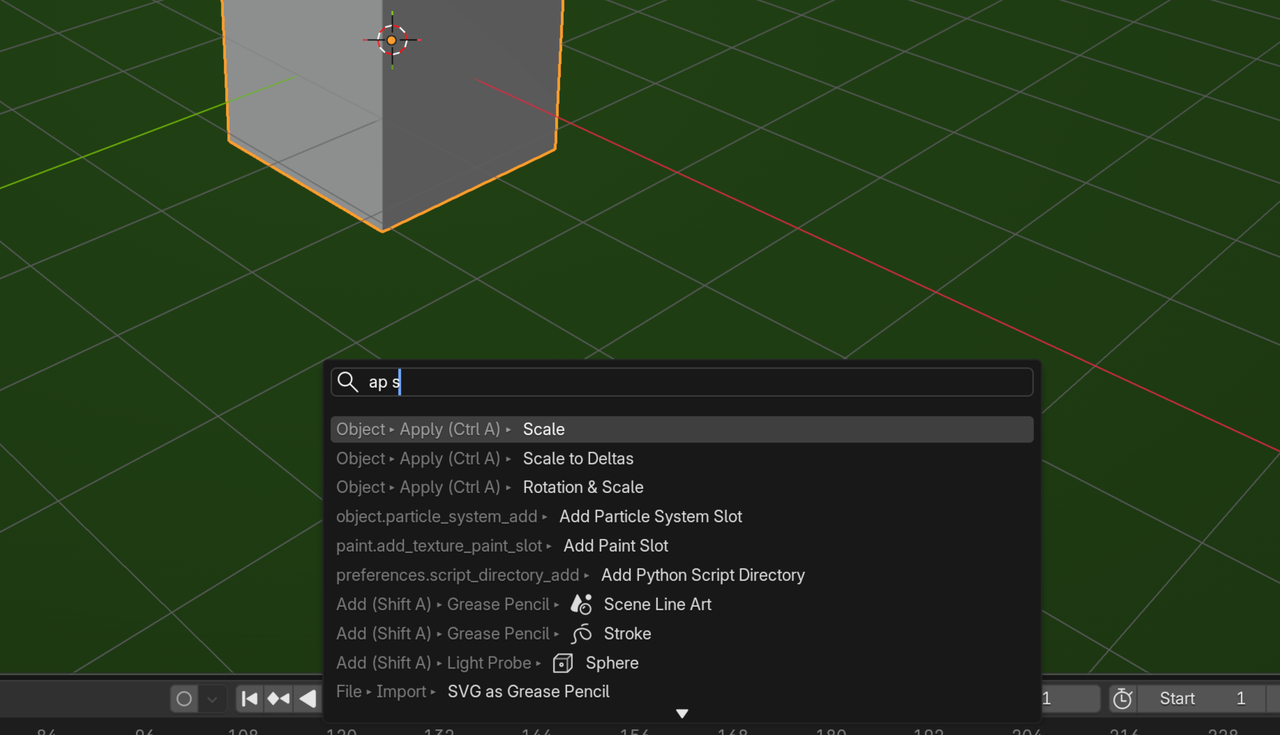
And if you know where something lives in the menus, Blender tells you the Shortcut (if there is any).
Apart from the fact that it's not a good idea to try and learn Blender's Shortcuts or where things are located by looking them up on a Reference Sheet, making such a PDF is problematic, because Shortcuts can differ for Left Click Select and Right Click Select, for instance and can also depend on some other Preference Settings. Not to mention, that Shortcuts tend to change with Blender Versions, so any PDF would be outdated after a few months.