Please pardon if this is a stupid question. I'm sure it has been asked dozens of times. I've hit a brick wall.
I'm trying (in 5.1) to instance objects on a mesh, perpendicular to the face normals. I managed this before with "Align Euler to Vector", which is now deprecated. I have not found a way to use the "similar" new node. (Or even get things to work with the deprecated node.) Unfortunately, I can't get any real understanding from reading the Blender manual pages. I haven't found anything simple or intuitive which works.
There are hundreds of explanations/examples using the old node (I carefully saved the information), but I can't find anything relevant for the new one.
Can anyone help? Thanks.

So you're wanting a new object to have the same rotation as another object? If I'm understanding this right, then what you want is Copy Rotation.
if not, I'm sure @waylow will be along at some point to provide better guidance :D )
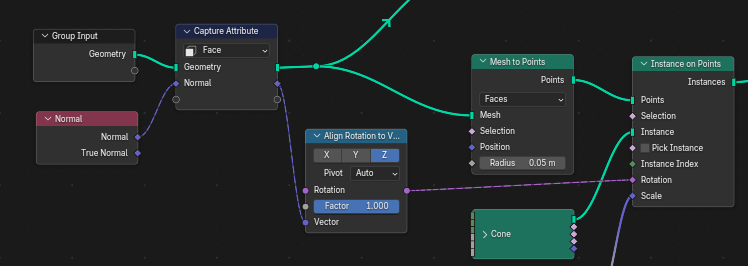
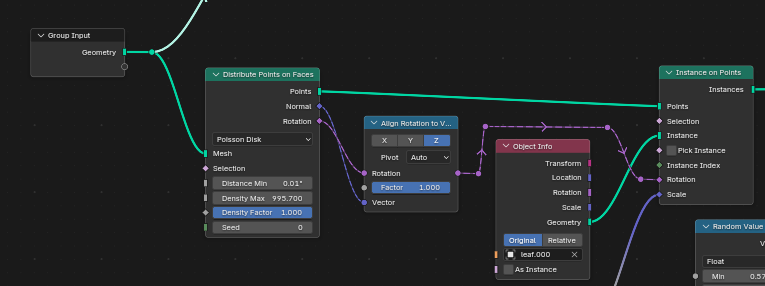
I'm going for the following - stumbled onto a method.
The confusing part is that "Instance on Points" needs 2 different node arrangements for alignment:

Oh, geo nodes? There's a Instance on Elements node that has a check box for Align Rotation

" I have not found a way to use the "similar" new node"
As far as I know, the main difference is in the name, so you should be able to just swap them out.
(The Node actually Aligns the Euler Rotation to a Vector and they apparently realised, that to abbreviate that to Align Euler to Vector was a terrible idea.)
Not sure, what exactly you want to know, tbh.
 spikeyxxx My issue was actually not the new node, but misunderstanding the difference(s) in handling Rotation.
gradyp Instance on Elements is a more elegant way to wrap everything up with less nodes. I hadn't tried it before because it looked intimidating, but it works nicely for the first case above.